The documents we may ask for, and how to get them.
During underwriting, your funding manager may request one or more of these documents to finish reviewing your file. This guide explains each one: what it is, why we ask for it, and how to pull it. Jump to whichever applies to you.
7 documents explained2 minute readSoft credit pull only
A Month-To-Date (MTD) report shows every transaction and balance in your business checking account from the first of the current month through today. It gives your funding manager a live snapshot of how your account is moving right now, between your last full statement and this moment.
How to get it
Log in to your online banking and open your main business checking account.
Set the date range from the first day of this month through today.
Open the Print option in your browser menu.
Change the printer setting to "Save as PDF."
Save the file, then upload it.
Watch the 60-second walkthrough
02
Proof of Ownership
We confirm that you own the business before funding it. Any one of the following documents works. Pick whichever you already have on hand.
A
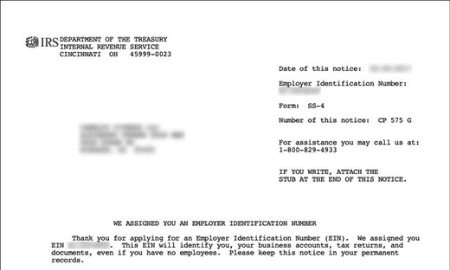
EIN Letter (SS-4)
An official IRS letter confirming your Employer Identification Number, the tax ID assigned to your business. It ties the business to you.
EIN Letter sample
B
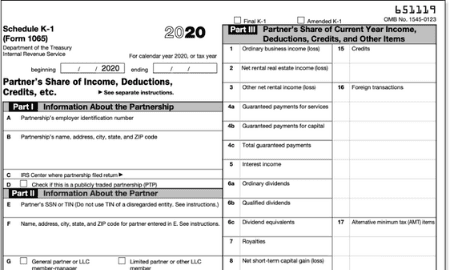
Schedule K-1
A tax document used by partnerships and S-corporations. It shows your share of the business income, deductions, and credits, which proves your stake.
Schedule K-1 sample
C
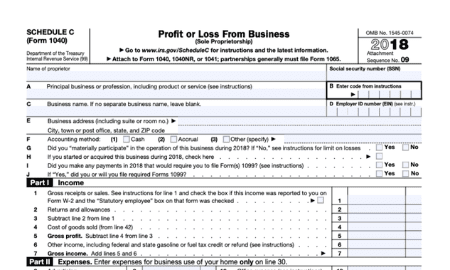
Schedule C
The tax form used by sole proprietors to report business profit or loss. It shows you run the business as an individual owner.
Schedule C sample
D
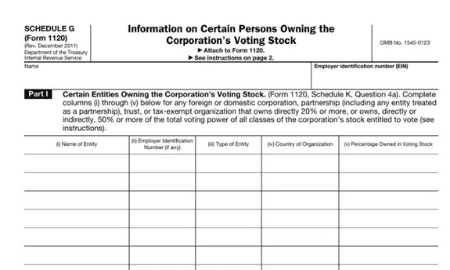
Schedule G
Used to report income distributions or allocations in certain cases, such as trusts or estates. Provide this if it applies to your filing.
Schedule G sample
03
A/R Aging Report
An Accounts Receivable (A/R) Aging Report lists the money your customers still owe you, grouped by how long each invoice has been outstanding: current, 1 to 30 days, 31 to 60 days, 61 to 90 days, and 90+ days past due. It shows your funding manager how healthy your incoming cash flow is and how quickly your customers pay.
How to get it
Log in to your accounting software (QuickBooks, Xero, FreshBooks, or similar).
Open Reports and search for "A/R Aging Summary" or "Accounts Receivable Aging."
Set the report date to today so it reflects your current balances.
Export or print it as a PDF, then upload it.
No accounting software? A simple spreadsheet with each customer, invoice amount, invoice date, and days outstanding works just as well.
04
Credit Card Processing Statement
If your business accepts card payments, your processing statement shows the total card sales you ran through your merchant account for the month. This confirms a steady share of your revenue, which matters most for retail, restaurants, and service businesses that take a lot of card payments.
How to get it
Log in to your payment processor (Square, Stripe, Clover, Toast, Fiserv, or whichever you use).
Open the Statements or Reports section.
Download the most recent monthly statement, or the last three months if you have them.
Save each one as a PDF, then upload it.
We are looking for your gross monthly processing volume, so make sure the statement shows total card sales, not just the fees.
05
Zero-Balance / Payoff Letter
If your business currently has an existing loan or merchant cash advance, we may ask for a payoff letter or a zero-balance letter. A payoff letter states the exact amount needed to fully clear that balance and the date it is good through. A zero-balance letter confirms an account is already paid in full. Either one lets us see your real obligations and structure your funding correctly.
How to get it
Contact your current lender or advance provider by phone or email.
Ask for a "payoff letter" with a good-through date, or a "zero-balance letter" if the account is settled.
Most lenders send it the same day or within one to two business days.
Save the letter as a PDF, then upload it.
06
Year-to-Date Profit & Loss
A Year-to-Date Profit and Loss statement summarizes your business revenue, expenses, and net income from January 1 of this year through today. It shows your funding manager how the business is performing this year. Date it within the last 60 days.
The fastest way: build it onlineOur free tool walks you through each line and emails you the finished PDF.
No accounting software? Your bookkeeper or accountant can produce a year-to-date profit and loss statement in a few minutes. Most other tools like Xero or Wave export it the same way.
07
Current Balance Sheet
A current Balance Sheet is a snapshot of what your business owns (assets), what it owes (liabilities), and the equity left over. It shows your funding manager your overall financial position right now. Date it as of today, or within the last 60 days.
The fastest way: build it onlineOur free tool keeps it balanced for you and emails you the finished PDF.
No accounting software? Your bookkeeper or accountant can produce a current balance sheet in a few minutes. Most other tools like Xero or Wave export it the same way.
Ready when you are
Got your documents? Upload them in two minutes.
Drop your files in our secure portal and your funding manager will pick up the review right away. Not started yet? Apply first and we will tell you exactly what we need.